
Table of contents
- Overview of the Users section
- Managing existing users
- Adding new users
- Restrictions on email addresses
- Multi-account users
- FAQ
- Video guide
Overview of the Users section
In the "Users" section, you see an overview of all user accounts currently set up for your company.
The user list shows, among other things, the following information:
- Name of the user
- Email address
- Time of invitation
- Time of last activity
Further actions can be accessed via the menu on the right side of each user.
The user "Support User simple system" for support purposes is visible in the user list and cannot be edited or deleted.
Managing existing users
Certain information can be adjusted for existing users.
This includes:
- Name of the user
- Phone number
- Email address
This information can be updated at any time.
Additionally, it is possible to delete users if they no longer need access to the platform.
You cannot delete your own user account. Please contact another administrator at your company or contact simple system vendor management.
Adding new users
New users can be created using the blue "Add user" button at the top right of the section.
This allows additional employees to quickly gain access to the platform and work together with your company on the platform.
Restrictions on email addresses
The email address of a user cannot be changed afterwards.
If a different email address is to be used, the existing user must first be deleted and then recreated with the new email address.
Multi-account users
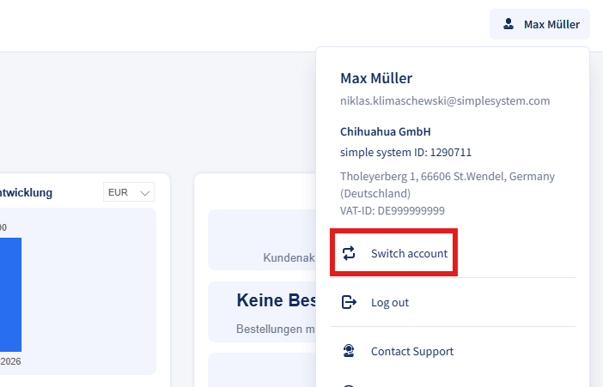
If a user account (= one email address) has been added to several company accounts — it does not matter whether these are multiple customer or vendor accounts, or a mix of both — you can switch to any other account to which your user has been added via the button with your username in the top right, under the "Switch account" option. See the screenshot below.
This means only one email address and one password are needed to access any number of company accounts.
FAQ
Where can I create new users?
Via the "Add user" button at the top right of the section.
Which user data can I change?
Name and phone number can be adjusted at any time.
Can I change a user's email address?
No. If a new email address is to be used, the user must be deleted and created again.
Can I remove users again?
Yes. Users can be deleted from the platform at any time if they no longer need access.
Video guide
Need help?
Do you have questions about user management or creating new users? Our technical support team will be happy to help.
Email: support@simplesystem.com
Phone: +49 (0) 89 / 998 2987 00
Phone support hours
Monday–Thursday: 8:00 AM–4:00 PM
Friday: 8:00 AM–3:00 PM