
Table of contents
- Overview of OCI (punchout)
- How the eShop connection works
- Benefits of the OCI integration
- Technical requirements
- Configuring the OCI link
- Technical data for transferring the cart
- Variants of user recognition in the OCI link
- Maintenance on the platform
- Restrictions and notes
- FAQ
Overview of OCI (punchout)
OCI (Open Catalog Interface) enables your eShop to be connected directly to the simple system platform.
Unlike static catalogues, OCI allows you to:
- represent complex and configurable products
- provide real-time data on prices and availability
- make your full assortment available
The OCI connection is an ideal complement to existing catalogue solutions and is often used in combination with BMEcat catalogues.
How the eShop connection works
When using an OCI catalogue, the customer is redirected from the platform directly to your eShop.
The process is as follows:
- Customer starts in simple system
- Redirection to your eShop
- Selection and, if applicable, configuration of products
- Transfer of the cart back to simple system
- Further processing in the procurement process (e.g. approval, ERP integration)
- Transmission of the order to the vendor
Benefits of the OCI integration
The OCI connection offers several benefits:
- Extension of your assortment beyond static catalogues
- Presentation of configurable and individual products
- Up-to-date prices and availability in real time
- Increase in the digital order rate
- Stronger customer loyalty and higher satisfaction
Technical requirements
Certain requirements must be met in order to use the OCI interface:
- Your eShop supports an OCI interface
- Return of the cart in UTF-8 format
- Transfer of relevant article information, e.g.:
- Description
- Price
- Quantity and unit
- Currency
- Delivery time
- Article and vendor numbers
The following is also recommended:
- at least one product image per article
- technical information (e.g. data sheets)
- ECLASS categorisation (from version 5.1)
Your eShop should be kept as streamlined as possible and should not contain any unnecessary content or external links.
Technical data for transferring the cart
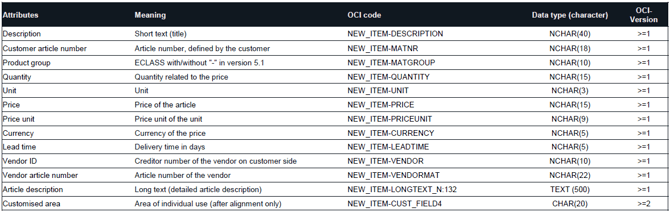
Configuring the OCI link
The connection is established via a jump-off link that redirects the customer to your eShop.
Standard configuration:
- login data is stored in the link
- all users of a customer use the same access
Advanced configuration (optional):
- transfer of user information such as name or email
- identification of individual users in the eShop is possible
The corresponding parameters are defined in the link and transferred automatically when it is called.
Variants of user recognition in the OCI link
Two different variants are available for user recognition when connecting your eShop.
Standard configuration
In the standard configuration, fixed login data is stored in the jump-off link.
This means:
- all users of a customer use the same eShop login
- individual user recognition does not take place
- a distinction is made at most on a technical level (e.g. via session IDs)
Structure of the link:
- [shop link]?[username]&[password]&[language_code]&HOOK_URL=
Example:
- https://www.shoplink.de/login?username=OCI&password=@ABC+123#&HOOK_URL=
User recognition (advanced configuration)
Alternatively, advanced user recognition can be set up.
In this case, additional user information is transferred when jumping to the eShop, for example:
- Username
- Email address
This information is integrated via variables in the link:
- ${userName}
- ${userEmail}
Structure of the link:
- [shop link]?[username]&[password]&[userName]&[userEmail]&HOOK_URL=
Example:
- https://www.shoplink.de/login?username=OCI&password=@ABC+123#&shopper-name=${userName}&shopper-email=${userEmail}&HOOK_URL=
This allows:
- individual users within a customer account to be identified
- individual user profiles to be loaded in the eShop
- personalised content or settings to be used in the eShop
Notes on use
- The exact naming of the parameters in the link is determined by the vendor
- The variables can be inserted at any point in the link before the "HOOK_URL" parameter
- The email address is only transferred if it is available in the system
By choosing the appropriate configuration, you can optimally adapt the integration to the requirements of your eShop and your customers.
Maintenance on the platform
Setup takes place directly in the vendor account:
- Open the "Catalogues" → "OCI catalogues" area
- Create a new OCI catalogue
- Insert the jump-off link
- Select the access method (GET or POST)
- Assign the catalogue to the desired customer
Prior activation of the OCI function is required.
Restrictions and notes
The following points should be noted when using the OCI interface:
- Articles can still be removed after the cart is returned
- complex configurations should be transferred as a single line item wherever possible
- not all OCI functions are supported
- text length may be limited
- not all user information is always available for ERP integrations
A clear structure and complete article data are crucial for smooth use.
FAQ
What is an OCI catalogue?
An OCI catalogue connects your eShop directly to the platform and enables ordering via a punchout process.
Do I also need a BMEcat catalogue?
In many cases, combining BMEcat and OCI makes sense in order to cover both standard and complex assortments.
How does the order process continue after the cart?
After the cart is returned, the normal ordering process continues via simple system.
Can individual products be represented?
Yes. The OCI connection is specifically suited for this.
Need help?
Do you have questions about the OCI integration or would you like to activate the function?
Email: support@simplesystem.com
Phone: +49 (0) 89 / 998 2987 00
Telephone service hours
Monday–Thursday: 8:00 AM–4:00 PM
Friday: 8:00 AM–3:00 PM