
Table of contents
- Basics of the feature
- Structure of the file for availability and delivery times
- Display and logic of availability
- Further usage notes
- Providing data via deep link
- Activation of uploads and updates
- FAQ
- Video guide
Basics of the feature
This feature is used to provide up-to-date information on the following points:
- availability of an article
- delivery time of an article
This information is provided independently of the catalogue and can be updated regularly.
However, the delivery time must always additionally be maintained in the catalogue field DELIVERY_TIME. This value is used when no delivery time is transmitted via the availability list.
Structure of the file for availability and delivery times
Use a CSV file for the upload. Please use the template provided on our FAQ page for this.
It is important that the headers are written exactly as in the template and are fully in uppercase letters.
The following fields are used:
- SUPPLIER_AID
Vendor's article number - QUANTITY
Available quantity of the article - DELIVERY_TIME
Delivery time in days - CUSTOMER_NUMBER
Optional customer number
CUSTOMER_NUMBER can be specified, but is not currently relevant. This field is reserved for possible future extensions.
Example of a file
The maximum file size for this file is 1 GB.
Display and logic of availability
The platform displays the availability of an article depending on the value in the QUANTITY field.
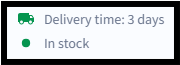
Article available
If QUANTITY is greater than 0:
- the article is displayed as "Available"
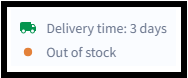
Article not available
If QUANTITY equals 0:
- the article is displayed as "Out of stock"
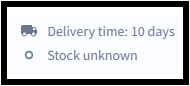
No stock information available
If there is no entry in the list:
- the article is displayed as "No stock information available"
Delivery time
The value in the DELIVERY_TIME field is given in days. Th field is shown in grey (like above), when the information for the delivery times comes from the catalogue. It is shown in green, when the information comes form the CSV list for availabilty & delivery time.
Example:
- 10 = delivery time of 10 days
If no delivery time is specified via the list:
- the delivery time is taken from the catalogue.
Further usage notes
The following rules apply to availability and delivery times:
- Currently, only a single list can be uploaded in the Availability & Delivery Times area.
- The values apply across catalogues and across customers for the respective article number.
- If an article number exists in several catalogues, the same availability value is displayed everywhere.
- The information applies regardless of which customers the respective catalogues are assigned to.
The list can be provided in two ways:
- manual upload via the platform
- automatic upload via the FTP server
You can find your individual FTP access data in the Availability & Delivery Times area at the top right under Automatic upload.
Providing data via deep link
Alternatively, stock and delivery time information can also be provided via an external link.
A so-called deep link is stored in the catalogue for this purpose.
The following fields must be maintained in the catalogue for this:
- MIME_TYPE
Value: url - MIME_SOURCE
The external link to the page with the stock or delivery information - MIME_DESCR
The name of the link shown to the customer
Example: "Availability & delivery time"
The link is displayed on the article page in the "Further documents" section.
The stock and delivery information opens in a separate browser window when the article is opened and is loaded from the external source.
Important:
- the data must continue to be maintained externally
- the retrieval speed should be sufficiently fast
Important notes on deep links
The following applies when using deep links:
- the specified URL must not contain any further navigation functions
- it may only contain relevant information on stock and delivery times
- delivery times from deep links are not taken into account in search or filters
If customers should be able to use delivery time as a search or filter criterion, we additionally recommend:
- storing an average delivery time in the catalogue field DELIVERY_TIME.
Example of the display:
Activation of uploads and updates
After an upload via the portal or the FTP server, the data is first processed.
The following applies:
- the upload is placed in a queue
- processing takes place in the order in which uploads were received
- once processing is successfully completed, the data is activated immediately
In the portal, you can see at any time:
- the current processing status
- when your data went live
FAQ
Why should I provide availability information?
Customers can immediately see whether an article is available. This can help avoid unnecessary order cancellations.
Can unavailable articles still be ordered?
Yes. Articles generally remain orderable, even if they are displayed as "Out of stock".
Can I upload several availability lists?
No. Only one list can be used at a time.
Does availability apply per customer or per catalogue?
No. The values always apply to the respective article number and are displayed across catalogues and customers.
What happens if no delivery time is specified in the list?
Then the delivery time is automatically taken from the catalogue.
Video guide
Need help?
Do you have technical questions or problems uploading availability or delivery times? Our technical support team will be happy to help.
Email: support@simplesystem.com
Phone: +49 (0) 89 / 998 2987 00
Telephone service hours
Monday–Thursday: 8:00 a.m.–4:00 p.m.
Friday: 8:00 a.m.–3:00 p.m.