
Introduction
The External Search Endpoint (ESE) is an interface that allows external systems to submit search queries to simple system and display the results in their own tools. This makes it possible to optimize internal processes, connect systems seamlessly, and significantly improve the user experience.
Creating a new ESE user
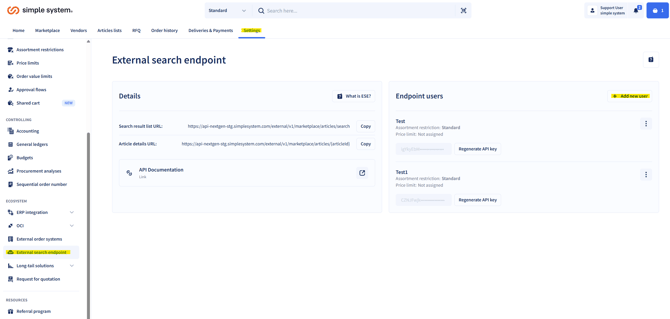
A new ESE user can be created using the “Add user” function.
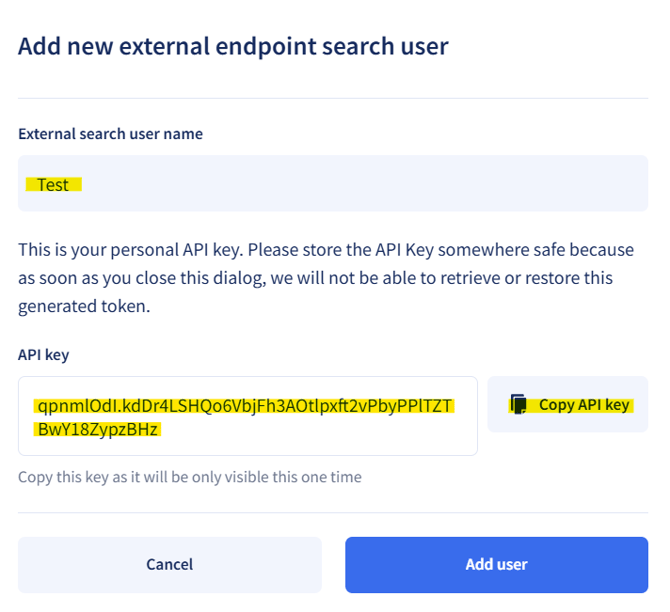
Required field:
-
ESE username – unique name for the endpoint user
API key:
-
A personal API key is generated for each user.
-
This key is only visible once.
-
It must be stored securely, as it cannot be displayed or recovered again afterwards.
-
A copy button makes it easy to securely save the key.
After entering the name and copying the API key, the user can be added.
Editing an ESE user
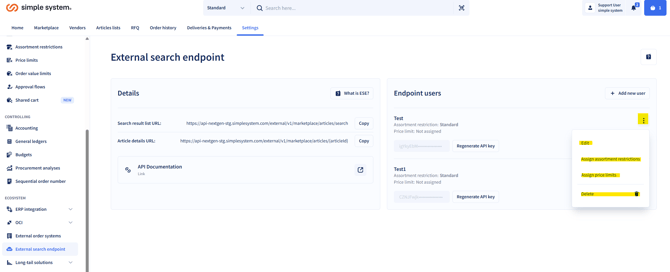
Once created, an ESE user can be configured further:
- The name can be changed at any time.
- Generate a new API key.
- Assign an assortment restriction.
- Assign a unit price limit.
Two options are available for each:
Note: Only one assortment restriction can be assigned per ESE user.
Deleting an ESE user
A user can be completely removed at any time.
More information about the ESE
Arcade walkthrough
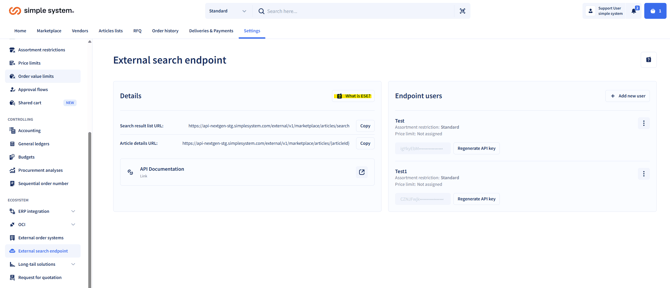
The “What is ESE?” button leads to an Arcade walkthrough that explains the endpoint visually and interactively.
Summary
The External Search Endpoint (ESE) is a powerful tool for seamlessly integrating simple system into external applications. It enables companies to display search results from the Marketplace directly in internal tools, making purchasing processes more efficient. The flexible assignment of assortment restrictions and unit price limits ensures compliance at all times. Managing ESE users is simple: users can be added, edited, or deleted, with each user receiving their own API key. Supplementary technical information, URLs, and an Arcade walkthrough support administrators in integrating and using the endpoint.