
In the article information you can store additional data on your articles. This includes:
-
Assigning customer article numbers by file upload (Excel).
-
Defining a core assortment for vendors.
-
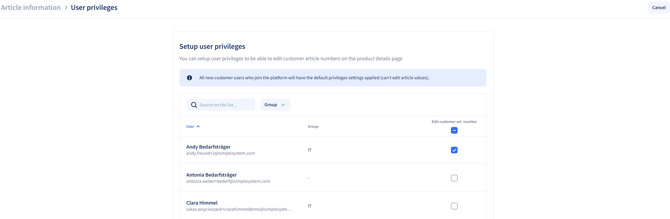
Assigning editing rights for users.
This allows article data to be extended individually and managed more effectively.
Functions in detail
1. Providing customer article numbers-
Upload of a customer article number list using the Add function
-
Only one list can be uploaded
-
The list can be updated at any time
-
Supplements the article data with customer-specific references
2. Defining a core assortment
-
Upload of a core assortment per vendor
-
Possible uses:
-
Recommendation of preferred articles
-
Controlled restriction of the displayed assortment (in combination with an assortment restriction)
-
-
Helpful for managing and optimising the article selection
3. Managing user permissions
-
Assignment of rights to edit:
-
Customer article numbers
-
External references at article level
-
-
This ensures that only authorised persons can make changes
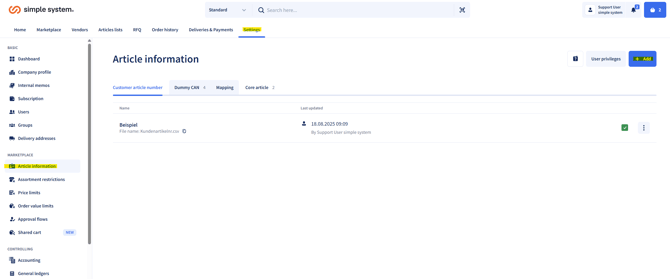
Procedure: file upload
-
Go to Settings > Article information
-
Click Add
-
Choose between:
-
Customer article number list
-
Core assortment
-
-
Upload the prepared file (templates are available for download)
-
Save the changes
Summary
The article information lets you flexibly supplement article data with customer-specific numbers and control it precisely through core assortments and assortment restrictions. By assigning user rights, you retain a clear structure and full control over your assortment at all times.
Here you will find the instructions and the corresponding templates for download:
Instructions for administrators